🏷️ Categories
Categories are your own folders for protection plans: Finance, Marketing, Client X. They do not change who can reach a plan; they only keep the overview readable as the number of plans grows.
You find them under Protection plans → Categories. The page is described as "Organise protection plans using custom categories."
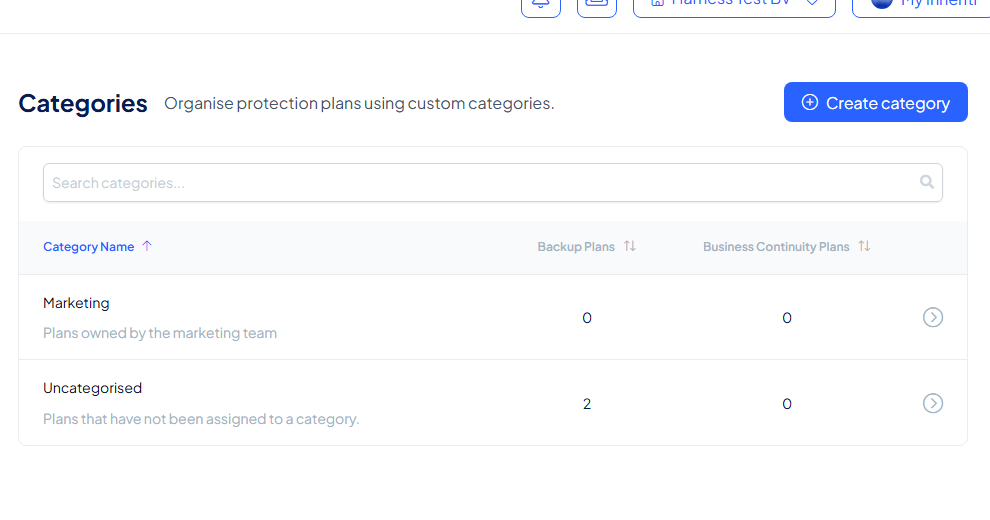
The overview
Every row shows a category's name and description, and how many Backup Plans and Business Continuity Plans it holds.
One group is always there: Uncategorised ("Plans that have not been assigned to a category"). Every plan that has no category of its own lives there, so a new organisation starts with all its plans in Uncategorised.
Create a category
- Select Create category (or Create first category while you have none).
- Give it a name (required) and, if you like, a description of up to 500 characters.
- Select Save category.
You land on the category's page with the confirmation "Plan category added successfully" and the choice to create another category.
What the category page shows
- Details: name and description, with Edit category and Delete category.
- Backup Plans and Business Continuity Plans: the plans in this category, each with the option to add plans: "Select existing plans to add to this category."
Put a plan in a category
- While creating a plan: step 2 of the wizard, Plan details, has a Category field. Pick an existing category, or choose Create new category right there. A plan you do not categorise stays in Uncategorised.
- On an existing plan: the plan's page shows its Category with an Edit link.
- From the category: add existing plans on its Backup Plans or Business Continuity Plans tab.
A plan belongs to one category at a time.
Good to know
- Categories are not limited on the Startup plan: your subscription page shows Categories as Unlimited, next to the limits that do apply (members, teams, plans and media storage).
- Categories never replace teams: teams decide who may access a plan, categories only decide where you find it.
- A category is not a governance object: it carries no access rule, gate or share, so renaming one never changes who can reach a plan.