🔀 Work in several organisations
Who can do this: Every member.
With one SafeID you can be a member of more than one organisation: your own, and others that invited you. Each organisation keeps its own plans, members, teams, settings and Organisation Key. You switch between them at the top of the page.
Switch organisation
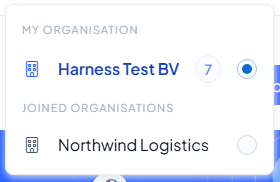
Select the organisation name at the top right of any page. The menu lists:
- My organisation: the organisation you own, if you have one.
- Joined organisations: the organisations you were invited to and accepted.
The organisation you are working in has a filled circle. Select another one to switch.
What changes when you switch
Everything on the page belongs to the organisation you selected: the plans, members, teams, categories, notifications and dashboard. The sidebar follows your role in that organisation. As a Manager in a joined organisation you see, for example, Insights and Audit trail under My Organisation, but not Billing, Subscription or Settings.
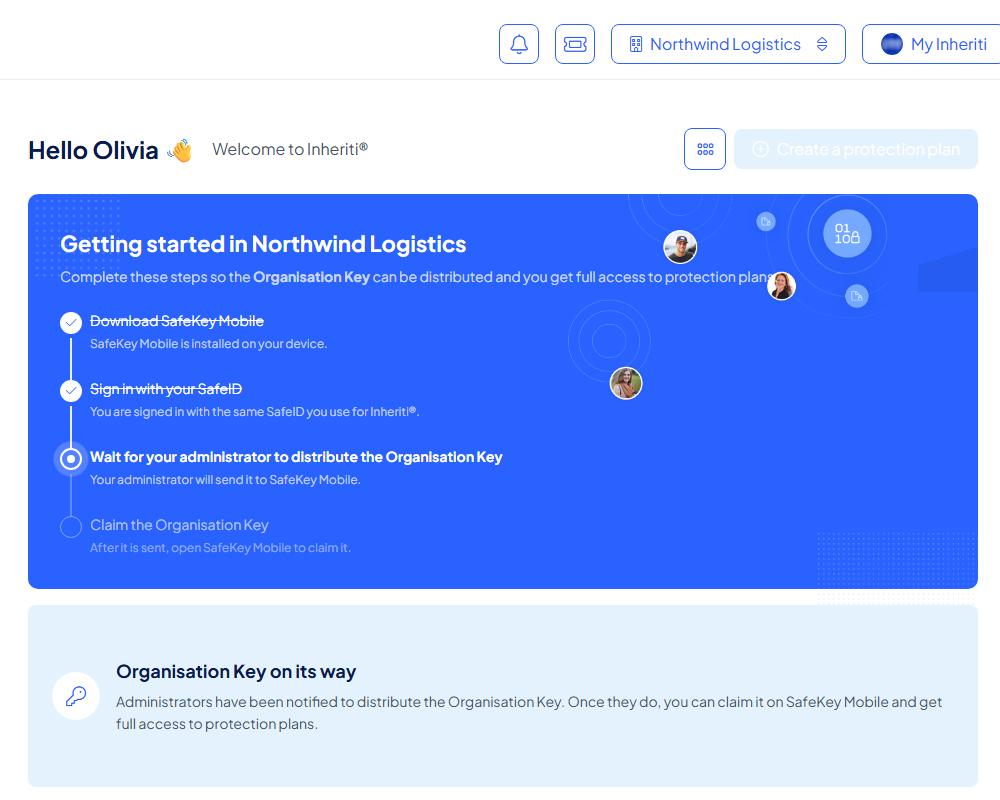
Each organisation also has its own Organisation Key. In an organisation you just joined, the dashboard shows Getting started in [organisation name] until an administrator has distributed that key to you and you have claimed it in SafeKey Mobile. See Accept an invitation.
Join another organisation
When an organisation invites you while you already belong to one, you accept the invitation the same way: see Accept an invitation. After you accept, the organisation appears under Joined organisations.